Showing posts with label Transformation Pack. Show all posts

Saturday, August 7, 2010

Download Snow Leopard Transformation Pack for Windows 7 / Vista

The most versatile transformation pack of Snow Leopard with cooperation from many talent artists in deviantart. This program will change the way you look at your Windows Vista/7 to be like Snow Leopard. It will set a new standard for what transformation pack should become. The program is redesigned on latest update from Seven Transformation Pack branch with easier and better in every aspect.


Features

Snow Transformation Pack comes with the following main features below:

Add applications to emulate Snow Leopard features like Dock, Spaces, Shadow, etc.
Change default logon screen background to default Snow Leopard wallpaper
Change system branding logo to Snow Leopard
Change system configuration such as taskbar position to look close to Snow Leopard
Change system icons and graphics to Snow Leopard
Change system theme to Snow Leopard
And much more

Download Snow Leopard Transformation Pack v1.0 – 29.5 MB

Monday, December 7, 2009

Seven Transformation pack 4.0

Seven Transformation Pack will convert your Windows XP/Windows Server 2003 based system to look like Windows 7 and some of its features emulated. You don't have to purchase Windows 7 or any 3rd-party applications to get Windows 7 UI experiences. This transformation pack will simply make it done for you for free!


This will update your Windows XP and Windows Server 2003 with Windows Seven GUI by adding some themes and replacing system files. Seven Transformation Pack gives to your system the fresh and cool look of Microsoft's new operating system: Windows 7. The pack changes most of the system icons, skins and toolbars and also adds new enhancements to your desktop.


Changes in Version 4.0:
-Added giannisgx89’s “Windows 7″ visual style for Windows Vista
-Added localization support with some fixes in wording and correction (You can modify vilang.sif for program to read in other languages. It may not work on languages with IME unicode charset though)
-Added more system files modification for Windows Vista
|-Shell Elements (Start Menu, Explorer)
|-Startup Animation
|-Tray Icons Set
-Added uxtheme.dll patching for custom theme compatibilities in Windows XP x64 Edition and Windows Vista (x86/x64)
-Added Windows setup files selection warning for people who use this normally but curious about it
-Added x64 system files modification support (Requires .NET Framework 2.0 or higher)
-Fixed 3rd-party applications startup conflicts with installation in configuration file
-Fixed boot screen not applying in some operating systems
-Fixed directory writable checking before preserving vtp.sif in local directory (CD, Network, etc.)
-Fixed exiting application when unsupported OS detected for uxtheme.dll patching instead of disabling uxtheme.dll patching
-Fixed launcher executable not being removed after uninstallation
-Fixed program not loading default configuration when vtp.sif isn’t present
-Fixed “Sevenlize basic desktop theme components” in Personalization to not apply default visual style when not selected
-Fixed some message boxes interrupting unattended transformation
-Fixed theme configuration bug when WindowBlinds isn’t installed
-Fixed Vista Rainbar gadgets positioning compatibilities with Windows Vista/x64
-Fixed Vista Rainbar not clearing startup settings when not installed in Personalization dialog
-Fixed WindowBlinds skin detection bug in Welcome Center
-Removed TrueTransparency from unsafe applications list but will be disabled when Windows Aero is running
-Removed Disable unsafe configuration that may harm system option since there’s no longer unsafe application available
-Updated multi-language support in logon screen and separated system files to modifying system files section
-Updated service pack checking compatibilities with x64 and non-RTM builds
-Updated system files verification to perform less file transfer operations
-Updated TrueTransparency to version 1.3 with x64 and blur support
-Updated ViGlance to version 1.0 build 1210 (Fixed pin saving)
-Updated ViStart to version 2.0 build 3686
|-Added Windows 7 User Interface (Windows X’s version)
|-Added Windows 7 Orb
|-Added Layout.xml for skin customization
|-Added Backwards compatibility with ViStart 6 skins
|-Added Greek language setting to Language Changer
|-Fixed Frequent items re-aligned to be more like Windows 7
|-Fixed Explorer keeps crashing randomly
|-Fixed Start button sometimes freezes
|-Fixed Games or full screen applications cause ViStart to sometimes stop being invoked
|-Fixed Sometimes ViStart disappears
|-Fixed Taskbar disappearance bug
|-Fixed Winkey combo-block bug
|-Fixed Poor interaction with ViGlance
|-Fixed New Programs Installed (Old Start Menu) bug
|-Fixed Floating Objects & Dual Screens bug
|-Fixed 64bit Support
|-Fixed Textbox invoke delayed focus
|-Fixed Invoke speed is about 9x faster
|-Fixed Font/Text not appearing on the right of the start menu
|-Fixed Blank hover image on Power menu and Frequently used programs
|-Fixed Recent items doesn’t appear on Windows Vista and Windows 7
|-Fixed Recent items menu is more responsive (26/10/2009)
|-Fixed Full support for Windows 7 x64/x86
|-Fixed Unresponsive/slow recent items menu in Vista and 7
|-Fixed The invalid picture bug
|-Fixed ViStart not loading the correct user picture in Windows Vista
|-Fixed Clear frequently used programs list tickbox in options sometimes doesn’t work
-Updated Windows Seven visual style
|-Start panel logoff buttons
|-Taskband group menu background and text color
|-Taskband scroll bar
|-Taskbar sizing bar
-Updated Windows startup sound with ones from imageres.dll instead of default sounds scheme


Sunday, December 28, 2008

Transform Windows Xp to Windows 7 Manually with Vishal.

    Since Windows 7 is under beta testing, its GUI is going to change in later builds. So we'll keep updating this tutorial to match the latest changes.

    Windows 7 provides lots of new features along with a newly designed interface. It looks very similar to Windows Vista but there are many GUI changes like redesigned taskbar, Explorer, new boot screen and login screen, etc.


    If you are still using Windows XP but want to enjoy the new Windows 7 look, then Vishal Gupta form askVG.com described detail for changing xp to 7 manually.This completely amazing and also without any customization pack. All you need to follow his instruction step by step and carefully. It will have lots of fun transforming windows xp to windows se7en manually and it also help you to know some trick in windows xp. the tutorial leads you step by step guide for changing:
    * Windows Theme or Visual Style
    * Icons
    * Boot Screen
    * Login Screen or Welcome Screen
    * Taskbar
    * Wallpaper
    * Progress Dialog Box
    * Shutdown / Log off Dialog Box
    * About Windows Box
    * System Properties Dialog Box
    * Extras like "Aero Shake", "Aero Snap", "Calculator" and "Wordpad"
    * A Few Other Mods...

    Before going to start you must know the new things in Windows Se7en. Windows 7 provides lots of new features along with a newly designed interface. It looks very similar to Windows Vista but there are many GUI changes like redesigned taskbar, Explorer, new boot screen and login screen, etc. Read out small review of windows se7en and its screenshot by Vishal Gupta.

    So ready to start new way of modification of windows xp with this tutorial.

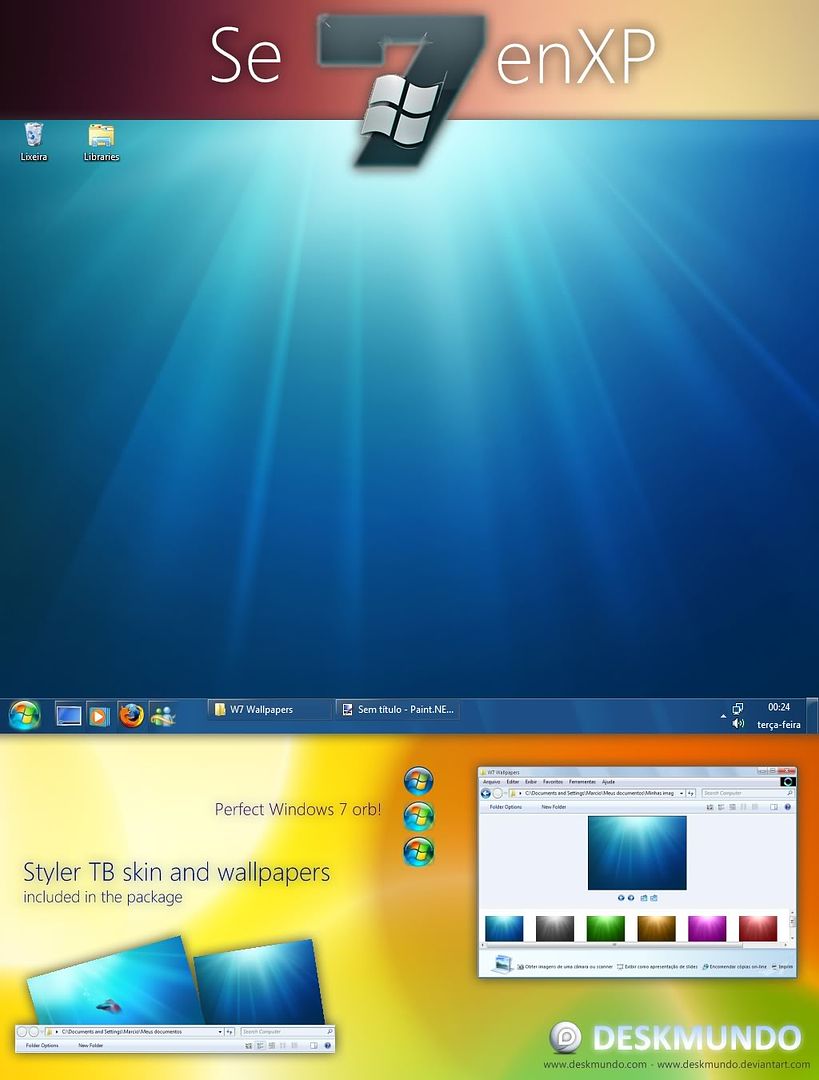
SevenXP: Transform Windows XP to Windows Seven

    Looking to transform windows xp to windows 7, so here is windows 7 transformation pack by deskmundo which build your XP to 7.

    If you are really crazy of windows Se7en then here is pack of just 3mb which changes your windows xp to windows 7 with edge. The pack contains the file *. msstyles, wallpapers removed from the Windows 7 and Styler Toolbar.


    Why use SevenXP?

    This is the theme that contains more and better details of Windows 7, look! You do not need to use any other resource, because the button on the Start menu is already in the center.In addition to Windows 7 Superbar has been emulated in Windows XP, but will still add more details.

    Installation and use

    In the package you'll find everything you need to know to properly install and use the visual style.

    Download: SevenXP
    or
    Download: SevenXP

    Enjoy with this theme.

Wednesday, November 12, 2008

Vista Transformation Pack 9.0


Vista Transformation Pack will give to your Windows XP system the new and cool look of Microsoft's future operating system: Windows Vista. The pack changes most of the system icons, skins and toolbars and also adds new enhancements to your desktop such as a dock bar or a different system tray clock. It is free and does a great job of giving machine a look similar to Vista.

It does have uninstallation options in case you decide you want to get rid of it, so there really isn’t anything to lose. However, when you install the software it has to overwrite some system files (it modifies things like the boot screen) so Windows will prompt you stating that your system files have been changed. It will ask whether you want to change them back or leave them, so just leave them if you want the system to function properly.

Vista Transformation Pack 9.0 Keynotes:

New 3rd-party applications

ViSplore - Vista Glass explorer simulator
Vista Drive Icon - adding free space percentage in your drive icon like Vista explorer
Vista Rainbar - Lightweight Vista sidebar based on Rainmeter that even consume less resources than real Vista Sidebar

Improved 3rd-party applications

ViStart - Files indexing for documents search, improved reliability and compatibilities
ViOrb - Improved graphic and reliability (C++ re-written)
TrueTransparency - Improved reliability with improved AeroStyle's glass border
WinFlip - Improved stability and reliablity

New functionalities

Setup personization - Allow customizing Vista experiences upon installation without access to Welcome Center
Windows XP Service Pack 3 compatibilities - Now you can enjoy Vista themes after installation with Windows XP Service Pack 3
x64 compatibilities - More secured x64 installation without getting hurt by incompatibilities

There're also a lot of bug fixes and refinements in the program but let's just keep it simple with these for now. You can experience the rest later by yourself.

Changes in Version 9.0:-

-Added Gavatx's Vista Rainbar 4.3 (Slim) in place of Thoosje's Vista Sidebar
-Added large icon resizing option for high resolution monitors
-Added Personalization setup screen for configuring current user account before installation
-Added running ViStart, ViOrb and ViSplore to WindowBlinds and TrueTransparency's exclusion list (prevent stability issues)
-Added ViSplore project (Vista Glass Explorer for Windows XP/2003)
-Added Vista Drive Icon in place of Vista Windows Drive Icon
-Added Windows XP Service Pack 3 uxtheme patching compatibilities
-Fixed automate 3rd-party applications optimization requirements
-Fixed graphic driver detection issues in transformation package for cases that doesn't use the first slot of driver
-Fixed OS detection incompatibilities with Windows Vista
-Fixed possible errors when auto-configuring user account during installation without "Express Mode"
-Fixed Thoosje Sidebar's auto-configuration bug on some resolutions.
-Fixed uninstallation script to terminate newly added applications such as WinFlip, TrueTransparency, etc.
-Fixed Vista orb positioning in "System Properties" dialog
-Fixed WindowBlinds' installation detection bug in configure user account dialog
-Updated Aero Style's glass border for more visibility and less distortion for both WindowBlinds and TrueTransparency
-Updated AeroStyle's glass border in TrueTransparency to simulate "little-blurring-like" WindowBlinds
-Updated boot screen to traditional ones without Vista flag
-Updated configure user account's installed components and applications UI
-Updated "Glass" sounds scheme from Windows Vista's Ultimate Extras
-Updated installation branding bar image
-Updated TrueTransparency to version 0.9.4
-Updated ViOrb to version 1 (C++ re-written)
|-Added start orb's right click menu
|-Fixed hook recovery when explorer shell is reloaded
|-Fixed always on top visibility issues with some applications including ViStart
|-Updated start orb graphic to for all sides compatibilities
-Updated ViStart to version 2.0 build 3467
|-Added font customization feature in settings.xml
|-Added indexing file search support like Vista (you can search for extension with .ext)
|-Added "Reset Shell" in menu option to reload explorer along with ViStart
|-Added multi-DPI Support
|-Fixed Chinese characters issue with Recent Documents
|-Fixed hook recovery when explorer shell is reloaded
|-Fixed start menu's hooking reliability with full screen and resolution changes
|-Fixed strange ActiveX errors
-Updated Visual style's top taskbar background to have the same image as bottom's like Vista
-Updated WinFlip to version 0.50
-Updated wording in some areas for easier understanding
-Updated x64 operating systems compatibilities

Sunday, November 9, 2008

Fedora Transformation Pack 1.0

Fedora Transformation Pack
Fedora transformation pack will freshen up your desktop with a great new look, including new themes, icons, wallpapers, screensavers and much more.

Fedora transformation Pack will transform your Windows user interface to an a great new stlye. You have never seen these icons or wallpaper before everything in this shell pack is new.

    What's New in This Release:

  • logon screen uninstalling fixed
  • added True Transparency
  • added Msn Messenger Skin
  • added Visual tooltip
  • Boot screen changed
  • Wallpaper changed
  • Skin(theme) changed
  • windows update icon changed
  • Control panel icon changed
  • Network connection icon changed
  • keyboard icon changed
  • Volume control icons changed
  • recycle bin icon changed
  • drive icon changed
  • folders icons changed
  • boot screen patched...


Monday, September 1, 2008

VISTize Se7en Summer Release


Another great release by friend mickyz in the month of August. Really wonderful package by him. I tested it in my computer and my PC look very awesome. I scanned with with NOD32 and detect no viruses. Hope my viewer will enjoy with this package.

installation notes:

- run installer without change the default path!
- patch your xp (sp2/sp3) by the install script#
- if script don't work, use windows safe mode
- remove shutdown/logoff text from explorer.exe#
- apply vistize visual style by desktop settings
- after run install/uninstall reboot your system!!!
#how to uninstall and restore original files:
- run uninstall script and reboot your system
- if script don't work, reinstall service pack 3
#how to remove shutdown/logoff text from explorer:
- disable windows file protection with wfpdisable#
- open explorer.exe with reshacker from windows
- go to string table and find resource value 439
- remove shutdown and logoff text from first line
#some antivirus erroneously report it's a virus