Showing posts with label AS3. Show all posts

Sunday, December 4, 2011

Analysis: Google Swiffy: Convert Flash to HTML


About a month ago we had from Google this extension presumely to transform Flash to HTML easily.

If you go to the website you can download it as an .mxp. I shall remind you that if you have more than one Flash version installed you could have a conflict with the Adobe Extension Manager. I had to unistall the previous version of it so as to run this extension.

Easy to install

Download the Swiffy Extension (.mxp file) and open it.Adobe Extension Manager will install the Swiffy Extension, making it immediately available to use from Flash Professional.

Export to HTML5 with one command

The new “Export to HTML5 (Swiffy)” item in the “Commands” menu exports your file to HTML5 and opens the result in your default web browser. Assigning a keyboard shortcut to this command makes it even easier!

Quick feedback

Information about the conversion process, such as features that are not supported by Swiffy, is shown in the “Output” panel, immediately after the export finishes.


So, you have it installed! And now?
Let´s make a simple banner with no Code, only timeline animation, with Actionscript 2 and exported as a .swf, you will have this:


Now, if you go to Flash > Menu> Commands > Export as HTML5 (Swiffy) you will have this advice first:
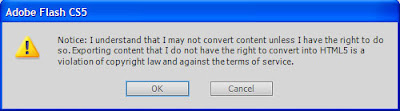
Later, your brower will open a new Tab, so if your .swf route was this:
whatever/300x250_timeline_animation_as2.swf

Now you will have this:
whatever/300x250_timeline_animation_as2.swf.html

And if you upload to a server and embed it


So, there´s no difference by now.

Let´s do this in Actionscript 3. You won´t have the Warning, and about the results:
Exported as .swf:

Exported with Swiffy as HTML5:


There´s no difference. I would even say that it´s easier in Actionscript 3 as there are no warnings.

So let´s try now with some code:
Do not try to do it in Actionscript 3, you will have this Warning:

Swiffy Flash Extension for Win v1.0.13 [Swiffy v3.6.1]
- Warnings -
Scenes are not supported.
ActionScript 3.0 is not supported.

In Actionscript 2 you can´t use blend modes.
The good news is that you can use Greensock library

For example in a banner in Actionscript 2 with this code:

[CODE]
import com.greensock.*;
import com.greensock.plugins.*;

function infiniteMovement()
{
textbanner._alpha=0;
TweenLite.to(textbanner, 1, {delay:1, _alpha:100});

TweenLite.to(textbanner, 1, {delay:3, _rotation:360, overwrite:false});
TweenLite.to(textbanner, 1, {delay:7, _alpha:0, overwrite:false, onComplete:onFinishTween, onCompleteParams:[4,bg]});
TweenLite.to(textbanner, 1, {delay:6, _rotation:0, overwrite:false});
}

function onFinishTween(parameter1:Number,parameter2:MovieClip)
{
infiniteMovement();
}

infiniteMovement();

stop();
[/CODE]

The result in HTML5 once exported is this:

Wednesday, November 2, 2011

Stage3D Game: 3D Alien Escape (Flash 11)

Stage3D Game: 3D Alien Escape


You need Flash Player 11 to play Stage3D Games:

How to play:
3D Game where you must exit post-apocalyptic worlds.
Left and Right Keys to Steer, Up and Down Keys to Accelerate, Space to Stop.

Monday, October 24, 2011

Stage3D Game: 3D Skill Car

Stage3D Game: 3D Flash Maze


You need Flash Player 11 to play Stage3D Games:

How to play:
3D Game where you must exit post-apocalyptic worlds.
Left and Right Keys to Steer, Up and Down Keys to Accelerate, Space to Stop.

Sunday, October 16, 2011

Stage3D Game: 3D Flash Maze (Flash11, Molehill)

Stage3D Game: 3D Flash Maze


You need Flash Player 11 to play Stage3D Games:

How to play:
Complete the race tracks the faster possible.
Left and Right Keys to Steer. Up and Down Keys to Accelerate. Space to Stop.

Tuesday, October 4, 2011

Stage3D Game: 3D Time Race (Molehill, Flash11)

Stage3D Game: 3D Time Race


You need Flash Player 11 to play Stage3D Games:

How to play:
Complete the race tracks the faster possible.
Left and Right Keys to Steer. Up and Down Keys to Accelerate. Space to Stop.

Sunday, November 8, 2009

AS3 Video Experiments


To do this you need:
- A camara, in this case, a broken Sony Ericsson W910. Yes it is broken, the effect of the image is not any plugin or filter, the mobile just fell down on the floor and its camera records as you see ;-]
- One online designer, in this case my workmate Elena Balduque.
- Free time and sense of humour. Well we did this on rest-times in our work. You can see here other videos like me eating chips here:


The aim was playing with cuepoints and events in AS3. I mus say, we recorded 10 videos, first one very long and then 9 different videos in nine positions, each one looking at the camara from a different view.

So first thing I tried was to implement the nine videos in a Flash via Netstream so as to deploy them. Once the user clicks any video this one becomes the central one and all the other videos just look at the selected one. The problem about this was that if you hadn´t a good connection videos were lost and all the experiment misunderstood.

So loading nine videos was near impossible. This is what I made: A timeline with 9 labels. So with the events I move from one to another depending on the position, is just adjusting.

You just can see the demo here:


Just click and you will see what I mean.

Thursday, January 8, 2009

How can Adobe make learning ActionScript 3 easier?


I was censured yesterday after making a comment on Mike Chambers' blog, How can Adobe make learning ActionScript 3 easier?

This is what I wrote:

"I am an animator-programmer with a background design migrating from AS2 to AS3

- First thing I shall say is that opinions in this blog don´t come from designers as expected (I am specifically interested in input from anyone who does not consider themselves hardcore developers).

- Second: Related to migration to AS3:

- We need more examples: There are good ones in Kirupa or in theFlashBlog but we still want more. For a designer examples must be CLEAR and SIMPLE, I have not found yet a good example about a whole website or frameworks.

- The DisplayList is bad done. There are things which used to be much more easier in AS2 and methods removed. Read Collin Moock. Usually a designer doesn´t need too much code. he just makes banners, microsites, maintennance work and websites. If you want a designer to use Flash with AS3 I think there´s no point. He will probably move to Flash Catalyst or will stay in AS2. I think this is a question of profiles, you cannot place a designer to program in OOP with AS3. If you want him to use Flash with AS3 you will have to think in other alternatives.

- There are good books as "Learning ActionScript 3.0 a Beginners Guide". But I cannot say the same from Adobe."

So, I understand he doesn´t like my opinion, but I think it should be there with the others...