Imagine this scenario: Flash is definetely dead and it has been replaced by HTML5. I do not support this statement at all, but it could be.
So: What happens in that case with display Ads?
One the big advantages of Flash is that it is a program which can be used by many differente profiles, such as designers, animators and developers. In my work I give support to more than 50 creative agencies to make RichMedia Ads, the more of them are made with Flash. In my opinion all conventional banners are made by designers, and about the 50% of RichMedia Ads also, the rest need more developer/animation skills.
So, if the previous statement happens: What would creative agencies do? To answer this we should go to the past. We must know that Flash was first a program for designers and animators, then, Flash progressed a lot, so many programmers also began to use it. And also many designers using Flash like me migrated and converted into designers-developers, what they called devigners.
But, to be honest, I don´t see these people moving to html5. Why? Because by now there´s not a wysiwyg program for html5, or is there?
Well, there´s a company called AdVine, Sprout, making something about this. This is called Sproutinc, the idea is this:
About a month ago we had from Google this extension presumely to transform Flash to HTML easily.
If you go to the website you can download it as an .mxp. I shall remind you that if you have more than one Flash version installed you could have a conflict with the Adobe Extension Manager. I had to unistall the previous version of it so as to run this extension.
Easy to install
Download the Swiffy Extension (.mxp file) and open it.Adobe Extension Manager will install the Swiffy Extension, making it immediately available to use from Flash Professional.
Export to HTML5 with one command
The new “Export to HTML5 (Swiffy)” item in the “Commands” menu exports your file to HTML5 and opens the result in your default web browser. Assigning a keyboard shortcut to this command makes it even easier!
Quick feedback
Information about the conversion process, such as features that are not supported by Swiffy, is shown in the “Output” panel, immediately after the export finishes.
So, you have it installed! And now?
Let´s make a simple banner with no Code, only timeline animation, with Actionscript 2 and exported as a .swf, you will have this:
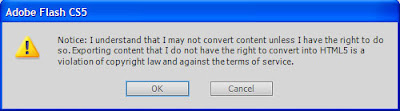
Now, if you go to Flash > Menu> Commands > Export as HTML5 (Swiffy) you will have this advice first:
Later, your brower will open a new Tab, so if your .swf route was this: